PLEASE ORDER YOURS NOW IF YOU NEED IT SOON. Supply chain issues are affecting almost every manufacturer. We will completely sell out of many items this season. Web site is updated at least twice daily on weekdays.
No risk to you. Your 100% Satisfaction is Guaranteed with our 30 Day "No Questions" Money Back Guarantee. Hassle-free returns & exchanges.
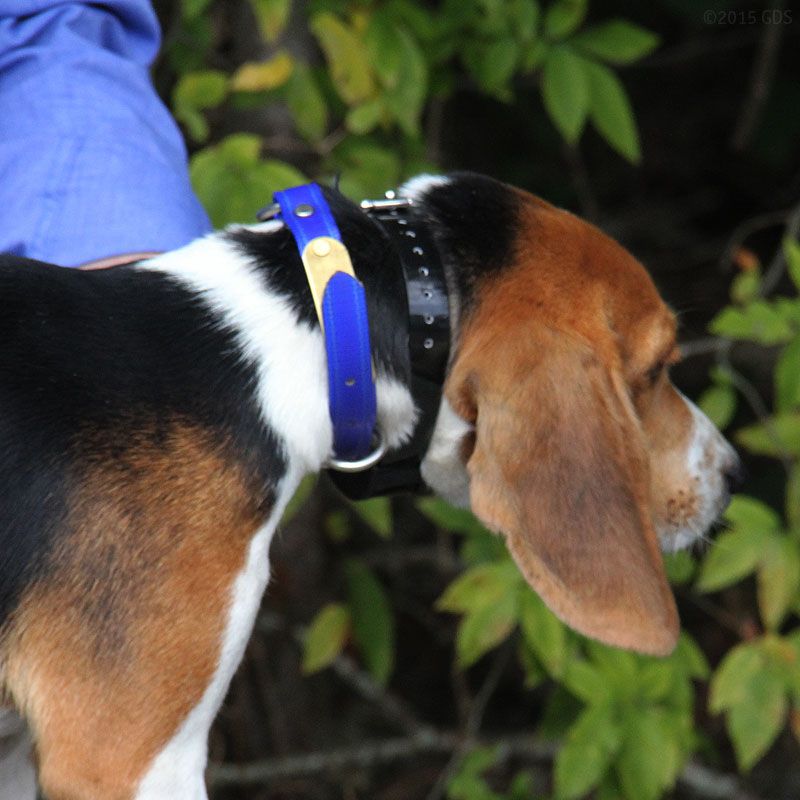
Original extra long-range collar for the SportDOG SD 3225 System. Includes 3/4" collar strap that fits up to a 23" neck, charger, short and long contact points, and charging cradle.
Synchronizing a Replacement Collar Receiver to your Transmitter
1. Program the Remote Transmitter to mode 1 or 2.
(Consult the SD-3225 Owners Manual for more information on Transmitter Modes.)
A. Set the Intensity Dial to the number of the desired mode.
B. Turn the Remote Transmitter over.
C. With a pen or paperclip, depress and release the mode button.
D. When the mode button is pressed, the Transmitter Indicator Light will be solid in color. When it is released, it will flash the same number of times as the mode selected.
2. Flip the toggle switch to the up position to program the first Collar Receiver.
A. Turn the Collar Receiver off.
B. Press and hold the On/Off Button. The Receiver Indicator Light will come on, then turn off in 4-5 seconds. If the On/Off Button is released too early, the Receiver Indicator Light will begin its normal flashing. If this occurs, start over and repeat from A.
C. After the Receiver Indicator Light has turned off, release the On/Off Button.
D. Press and hold the Upper Button on the Remote Transmitter until the Receiver Indicator Light flashes 5 times.
3. Program the second Collar Receiver the same way using A through D above, but with the toggle switch in the down position.
How to Program the Collar for Three-Dog Operation with the SD-3225
1. Program the Remote Transmitter to mode 3 or 4.
(Consult the SD-3225 Owners Manual for more information on Transmitter Modes.)
A. Set the Intensity Dial to the number of the desired mode.
B. Turn the Remote Transmitter over.
C. With a pen or paperclip, depress and release the mode button.
D. When the mode button is pressed, the Transmitter Indicator Light will be solid in color. When it is released, it will flash the same number of times as the mode selected.
2. Flip the toggle switch to the up position to program the first Collar Receiver.
A. Turn the Collar Receiver off.
B. Press and hold the On/Off Button. The Receiver Indicator Light will come on, then turn off in 4-5 seconds. If the On/Off Button is released too early, the Receiver Indicator Light will begin its normal flashing. If this occurs, start over and repeat from A.
C. After the Receiver Indicator Light has turned off, release the On/Off Button.
D. Press and hold the Upper Button on the Remote Transmitter until the Receiver Indicator Light flashes 5 times.
3. Program the second Collar Receiver using A through D above, but using the Lower Button in place of the Upper Button.
4. Program the third Collar Receiver using A through D above, but using the Side Button in place of the Lower Button.
How to Program the Collar for Six-Dog Operation with the SD-3225
1. Program the Remote Transmitter to mode 5 or 6.
(Consult the SD-3225 Owners Manual for more information on Transmitter Modes.)
A. Set the Intensity Dial to the number of the desired mode.
B. Turn the Remote Transmitter over.
C. With a pen or paperclip, depress and release the mode button.
D. When the mode button is pressed, the Transmitter Indicator Light will be solid in color. When it is released, it will flash the same number of times as the mode selected.
2. Flip the toggle switch to the up position to program the first Collar Receiver.
A. Turn the Collar Receiver off.
B. Press and hold the On/Off Button. The Receiver Indicator Light will come on, then turn off in 4-5 seconds. If the On/Off Button is released too early, the Receiver Indicator Light will begin its normal flashing. If this occurs, start over and repeat from A.
C. After the Receiver Indicator Light has turned off, release the On/Off Button.
D. Press and hold the Upper Button on the Remote Transmitter until the Receiver Indicator Light flashes 5 times.
3. Program the second Collar Receiver using A through D above, but using the Lower Button in place of the Upper Button.
4. Program the third Collar Receiver using A through D above, but using the Side Button in place of the Lower Button.
5. For Collar Receivers 4, 5, and 6, flip the toggle switch to the down position and repeat steps 2-4.
I have been using my Sport Dog 3225 e collars for close to 13 years now. Probably one of the best items to happen with my Beagles. I would give this product 5 stars except for the fact that once I setup for 3 dogs I lose the tone feature of the transmitter. My two oldest Beagles have not been nicked or shocked for going on 5 years now. They respond extremely well to tone. If SportDog could find a way to set up the tone feature when using the transmitter for 3 or more dogs, it would be greatly appreciated.
Pros
Excellent range. Great Collar/Transmitter for my Beagle Hounds. A true blessing for anyone handling Beagles, when used properly. I can recommend.
Cons
No tone feature when set up for 3 or more dogs.
By Customer
Henderson, North Carolina
Sportdog SD-3225
January 14, 2021
Collar just what I needed it’s the same as the original collars
By Dustin D.
LA
Review for SportDOG SD-3225 Add-A-Dog Additional Collar / Extra Receiver SDR-AH
October 12, 2018
By Carl
VA
Review for SportDOG SD-3225 Add-A-Dog Additional Collar / Extra Receiver SDR-AH
March 6, 2016
I hunt rabbits with beagles and originally bought the SportDog SD-3225 set up for 3 dogs to try it out. It worked great and the range was what I needed. (There are a lot of deer where I hunt) I hunt with 6 beagles so I had to get the other 3 additional collars. I really like having one transmitter for all 6 dogs and the vibration/tone option works great.
By Paul U.
KY
Review for SportDOG SD-3225 Add-A-Dog Additional Collar / Extra Receiver SDR-AH
March 3, 2016
The Sportdog 3225 is a very good system. It is hot and has a very good range. I haven't had any trouble out of it.
By Terry M.
LA
Review for SportDOG SD-3225 Add-A-Dog Additional Collar / Extra Receiver SDR-AH
January 9, 2016
I would recommend Steve and Gun Dog Supply to everyone
By Rodney C.
AR
Review for SportDOG SD-3225 Add-A-Dog Additional Collar / Extra Receiver SDR-AH
November 27, 2015
This unit is one I got to replace one of a 6 dog setup that went bad after several years. The other five are still working great. This is a pretty good system. I use it for trash breaking and behavioral problems.
By Charles H.
MO
Review for SportDOG SD-3225 Add-A-Dog Additional Collar / Extra Receiver SDR-AH
November 17, 2015
This unit works just fine. Same as the SD 3225, easy to set up. I am very satisfied with both units. I would not go to five stars at this time, since I do not have that much time on them and would like to see how well they hold up.
By Randy P.
AL
Review for SportDOG SD-3225 Add-A-Dog Additional Collar / Extra Receiver SDR-AH
September 30, 2015
I've been using the SD3225 for over a year without any problems. The only issue I've had is if you're hunting very hilly land the service is hit and miss.
By Ted T.
NJ
Review for SportDOG SD-3225 Add-A-Dog Additional Collar / Extra Receiver SDR-AH
July 11, 2015
Great product. Works very well! Got the dogs trained in no time. Also great service!
By Russell M.
MA
Review for SportDOG SD-3225 Add-A-Dog Additional Collar / Extra Receiver SDR-AH
December 18, 2014
The Sportdog Correction Collars work well for me. I do not like the combined correction and gps collars. Personal preference. Running three dogs, I can have both an audio correction or the stimulus correction with the flip of a toggle. They are expensive, but get it done the way I need it done. My dogs have been trained to come to me on sound, as if I had whistled for them. A much more stealthy approach. Their range is fantastic, also...
By Randy M.
FL
Review for SportDOG SD-3225 Add-A-Dog Additional Collar / Extra Receiver SDR-AH
December 7, 2014
Great way to control my dogs not to get on posted land.
By Zac B.
OK
Review for SportDOG SD-3225 Add-A-Dog Additional Collar / Extra Receiver SDR-AH
November 30, 2014
I've had my SD 3225 for a year now and love it. It's very user friendly and dependable and it's simple to add collars. You also can't beat the service that Gun Dog Supply provides.
By Jeffery P.
Review for SportDOG SD-3225 Add-A-Dog Additional Collar / Extra Receiver SDR-AH
November 19, 2014
Had the SD 3225 for a year now for my 3 year old lab. I put the collar on her, and that's all she needs. We hunt birds all season long. I now also have a 6 month old lab and will start to work with her in a couple months after she knows her basic commands. Great product and support.
By James E.
MS
Review for SportDOG SD-3225 Add-A-Dog Additional Collar / Extra Receiver SDR-AH
November 9, 2013
I've always used Tri tronic collars but after using the Sport Dogs I'll never own another brand.
GUN DOG SUPPLY - "Serving Hunting & Field Dog Owners Nationally Since 1972."
Order online via Secure Server or call 1-800-624-6378 to order! GDS Warehouse, 17645 U.S. Highway 82, Mathiston, Mississippi, 39752 USA.