steve-snell dog training collar reviews We train OUR DOGS with the dog training collars we sell
Tri-Tronics dog training collars
Help me choose:
a dog training collar,
a dog tracking system,
or a bark collar.

free shipping on gun dog training supplies on $125+ Orders US48

US 48 - $125+ Orders
$5.95 Standard Rate

search 3500+ dog supplies pages
gun dog supply shipping infogun dog supply shopping cart

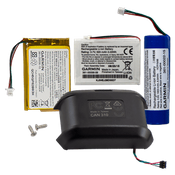
Garmin DC 30 Replacement Lithium-Ion Battery

Garmin DC 30 Replacement Lithium-Ion Battery
Read Product Info
$49.00
Code: 4059
Qty:
Usually ships the same business day.


Read more about the Garmin DC 30 Replacement Lithium-Ion Battery

The DC 30 Battery Replacement Kit includes:
  • One rechargeable lithium-ion battery
  • Two battery-cover screws
  • Four bottom-cover mounting screws

    Note: It is not necessary to disconnect the DC 30 from the mounting plate on the collar to replace the battery.

    To remove the old DC 30 lithium-ion battery:
    1. Use a small Phillips screwdriver to remove the four top-cover screws from the top cover.
    2. Separate the top cover from the bottom cover.
    3. use a small, flat-blade screwdriver to disconnect the six-pin connector from the top cover.
    4. Use a small, flat-blade screwdriver to disconnect the two-pin connector from the bottom cover.
    5. Use a small Phillips screwdriver to remove the two battery-cover screws.
    6. Remove the battery cover and the battery from the bottom cover.
        Note the orientation of the battery in the bottom-cover housing. You will install the new battery the same way. Dispose of the old battery according to local ordinances and regulations.


    To install the new DC 30 lithium ion battery:
    1. Place the replacement battery in the bottom cover. Place the wired end of the battery on the same end as the Power Key on the bottom cover.
    2. Attach the battery cover to the bottom cover using the two battery-cover screws.
    3. Connect the replacement-battery two-pin connector to the bottom cover.
    4. Connect the replacement-batter six-pin connector to the top cover by using your thumb to hold the connector against the housing.
    5. Check to ensure proper operation of the replacement battery by pressing the circuit-board switch. If the red LEDs on the bottom cover do not begin flashing, check the six-pin connector for proper connection.
    6. Check the charging circuit by connecting the Astro System DC 30 battery charger to an appropriate electrical source and to the battery-charging port. If the blue LED is not on, check the two-pin connector for proper connection.
    7. Firmly attach the top cover to the bottom cover using the four top-cover screws to ensure water resistivity.
    8. Fully charge the DC 30 battery before using it as described in the Astro 220 Owner's Manual. Charging a fully depleted DC 30 battery requires 4.5 hours.


    Buy Garmin DC 30 Replacement Lithium-Ion Battery

    Read Product Info
    $49.00
    Code: 4059
    Qty:
    Usually ships the same business day.


    Garmin Car Power Adapter for Astro DC-30 Browse Previous Product:
    Garmin Car Power Adapter for Astro DC-30
    Garmin Astro DC-20 Lithium Ion Battery PackShop Next:
    Garmin Astro DC-20 Lithium Ion Battery Pack


    Before you decide which collar to buy, read our Dog Training Collars guide for dog product comparisons, features, reviews, & more information. -- res
  • 1-800-624-6378
    shipping-map
    free-shipping


    garmin


    1258676337