Zinger Winger How-To: Reversing the Remote Release PolarityFirst, be sure to follow all instructions for synchronizing the remote release system in the Owner's Manual. Connect the receiver to your Zinger Winger. Test to make sure the receiver is getting signal from the transmitter by testing the sound button on the transmitter. If you activate the receiver and the release mechanism doesn't move, you need to reverse the wire connections. 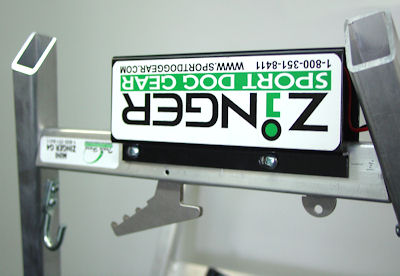 1. Flip your Zinger Winger upside down to make it easier to access the release mechanism wiring. 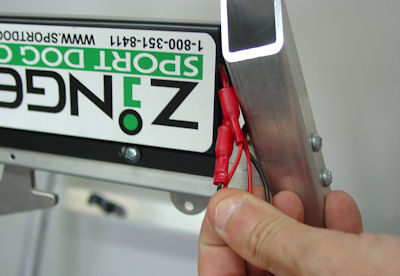 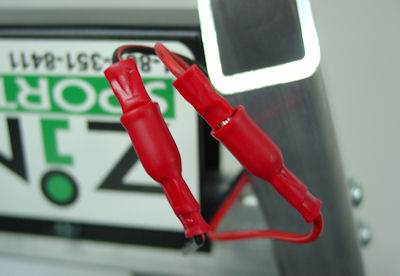 2. From the side of the release cover, you should be able to reach in and pull the two wires out exposing the bullet connections. 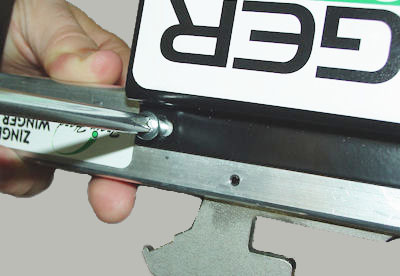 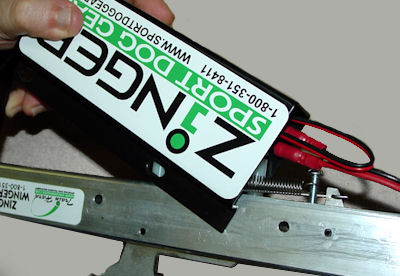 (If the wires are inaccessible, you will need to remove the metal protective cover by removing the two screws and sliding it to the left.) 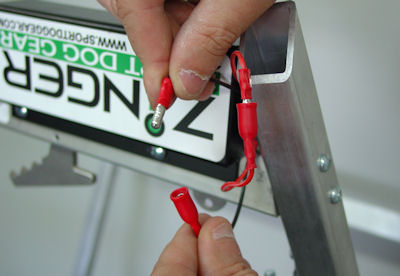 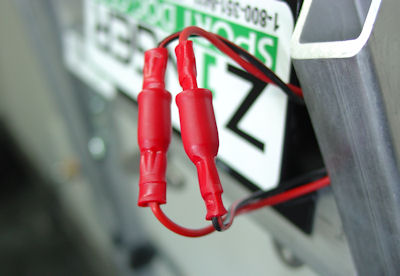 3. Swap the connections. 4. Try it again and the release trigger should move significantly. Steve Says:From time to time we get calls or emails from customers who are having trouble setting up their remote release system with their new Zinger Winger Remote Ready launcher. Most of the time it is a simple matter of reversing two wire connections to solve the problem. The Zinger Wingers are compatible with the Tritronics Pro Control and the Dogtra remote release systems. The problem is that the polarity of the Tritronics and Dogtra receivers are opposite. In plain English, depending on which release system you are using and how the launcher is wired at the factory, you may need to switch the wire connections.  Steve Snell |




FREE SHIPPING on Orders $125+ |
 |  |  |